
In the world of Electrical and Instrumentation (E&I) engineering, data is the foundation of every successful project. From the initial Instrument Index to complex loop diagrams and data sheets, managing thousands of tag numbers requires a robust strategy. Historically, Microsoft Excel has been the “Swiss Army Knife” of the industry, but as projects grow in complexity, many firms are migrating toward dedicated engineering databases like SmartPlant Instrumentation (SPI) or AVEVA Instrumentation.
The question for project managers and lead engineers remains: Which tool is right for your project? In this article, we explore the trade-offs between spreadsheets and databases, focusing on efficiency, scalability, and data integrity.
When Excel is Sufficient
Despite the rise of sophisticated software, Microsoft Excel remains a staple in instrumentation departments. There are specific scenarios when Excel is sufficient for managing instrumentation data:
- Small-Scale Projects: For minor brownfield modifications or small skid packages with fewer than 200–300 tags, the overhead of setting up a relational database often outweighs the benefits.
- Front-End Engineering Design (FEED): During the early stages of a project, data is fluid. Excel allows for rapid prototyping, quick bulk edits, and easy sharing with stakeholders who may not have access to specialized engineering software.
- Limited Budgets and Resources: Engineering databases require significant investment in licenses and specialized personnel (Database Administrators). If the project budget or the team’s technical expertise is limited, a well-structured Excel template can get the job done.
- One-Off Data Collection: For simple site audits or equipment lists where relational links (like cable schedules to junction boxes) aren’t the primary focus, a spreadsheet is often the fastest tool available.
When Database Systems are Needed
As a project scales, the limitations of a flat-file system like Excel become apparent. You know when database systems are needed when the “Single Source of Truth” begins to fracture.
1. Complex Data Relationships
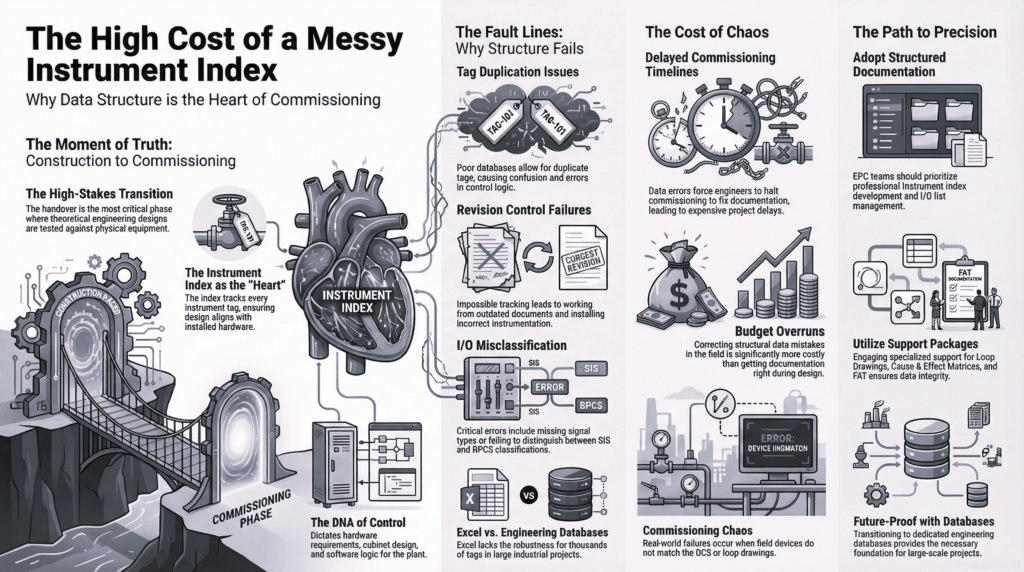
Instrumentation data is inherently relational. A single tag is linked to a datasheet, a loop drawing, a junction box, a Marshalling Cabinet, and an I/O card. Excel struggles to maintain these links. In a database, changing a tag name once updates it across every associated document automatically.
2. Multi-User Collaboration
Excel “File in Use” errors are a bottleneck for large teams. Engineering databases allow dozens of engineers and designers to work simultaneously on the same dataset without risk of overwriting each other’s work.
3. Lifecycle Management
For large EPC (Engineering, Procurement, and Construction) projects, the data must eventually be handed over to the owner-operator. A database provides a structured format that integrates easily into Asset Management Systems (AMS) and Maintenance Management Systems (CMMS), providing value long after the design phase is over.
Version Control Best Practices
Regardless of the tool you choose, data is only as good as its last revision. Implementing version control best practices is essential to prevent costly field errors.
- For Excel Users: Avoid naming files “IndexFinalv2Updated.” Instead, use a standardized naming convention with ISO dates (YYYY-MM-DD) and maintain a “Revision History” tab within the workbook.
- For Database Users: Utilize the software’s built-in revision management tools. Ensure that “frozen” data (data sent for construction) is locked to prevent accidental modifications.
- Audit Trails: Always log who changed what and when. In a database, this is automated. In Excel, this requires strict discipline and manual entry.
The Importance of Change Management
In instrumentation, a change in a process condition (like a pressure increase) can trigger a cascade of updates—from the transmitter range to the alarm setpoints in the DCS. Effective change management ensures these ripples are captured across the entire project.
If you are using Excel, change management relies heavily on manual cross-checking, which is prone to human error. Database systems, however, utilize “Management of Change” (MOC) workflows. These workflows can flag inconsistencies—for example, alerting an engineer if a cable is assigned to a deleted instrument.
To maintain integrity during changes:
- Define a Clear Workflow: Establish who has the authority to approve changes to the Instrument Index.
- Impact Analysis: Before implementing a change, identify every document (Loop, Hook-up, Datasheet) that will be affected.
- Communication: Use automated notifications or regular coordination meetings to ensure the Electrical, Process, and Piping teams are aligned with the latest Instrumentation data.
Conclusion
Choosing between Excel and an engineering database isn’t about which tool is “better” in a vacuum; it’s about choosing the right tool for the project’s scale and complexity. When Excel is sufficient, it offers unmatched flexibility and speed. However, when database systems are needed, they provide the structural integrity and multi-user environment required for modern, large-scale engineering.
By following version control best practices and maintaining a rigorous approach to change management, E&I engineers can ensure that their data remains an asset rather than a liability, leading to safer and more efficient project execution.