How Brownfield Projects Fail Due to Documentation Gaps

In the world of industrial automation, a “Greenfield” project is a dream—a blank slate where every wire, tag, and logic block is documented from scratch. However, the reality for most commissioning engineers is the “Brownfield” project. These migrations involve upgrading legacy systems that have been running for decades.

While the goal of a Brownfield Control System Migration is improved efficiency and modern capabilities, many of these projects fail before the first loop is even tuned. The culprit? Documentation gaps. When the digital record doesn’t match the physical plant, the project is headed for a costly disaster.

The “As-Built” Myth: Old Drawings vs Field Reality

The most common point of failure in any migration is the reliance on outdated documentation. On paper, the plant has a set of “As-Built” drawings. In reality, these documents are often “As-Designed” from twenty years ago.

The gap between old drawings vs field reality is created by years of “midnight engineering.” When a sensor fails at 3 AM on a Tuesday, a maintenance technician might bypass a relay or move a wire to a spare I/O point to keep production running. If that change isn’t redlined and updated in the master CAD files, that discrepancy remains hidden until the migration begins.

During a cutover, discovering that a critical interlock isn’t where the drawing says it is can stop a project in its tracks, leading to expensive downtime and safety risks.

The Tagging Nightmare: Legacy Tag Mismatch

Software migration is more than just importing a database from an old PLC to a new DCS. One of the most significant documentation risks is the legacy tag mismatch.

Over decades, naming conventions evolve. What was once PUMP*101*START in the old code might be referenced as P*101*ST in the HMI, while the physical terminal block is labeled P101-S. When engineers attempt to map these tags to a new system without a 1:1 verified cross-reference, the communication breaks.

A legacy tag mismatch results in:

  • HMI screens displaying “Comm Fail” or incorrect data.
  • Alarms failing to trigger during critical events.
  • Automated sequences hanging because they are looking for a status bit that no longer exists under the old name.

The Silent Killer: Hidden IO Changes

If the software is the brain, the I/O is the nervous system. Hidden IO changes are the silent killers of Brownfield projects. These are the physical modifications—splitters, signal conditioners, or local overrides—that were never added to the I/O list.

During a Brownfield Control System Migration, the new controller is programmed based on the existing I/O list. If that list is missing 10% of the actual field connections, the new system will be blind to those inputs. Commissioning engineers often find themselves tracing wires through packed cable trays in the middle of a shutdown, desperately trying to figure out why a valve won’t move, only to find a hidden interlock relay buried in a junction box.

Missing the Mark: Migration Freeze Windows

In industrial environments, time is money. Most migrations are scheduled during “turnarounds” or migration freeze windows. These are narrow periods where production is halted, and the engineering team has a set number of hours to swap the old system for the new one.

Documentation gaps turn these windows into nightmares. If the team spends 48 hours of a 72-hour window troubleshooting old drawings vs field reality, the project will likely exceed the window. This leads to:

  1. Production Overruns: Every hour past the window costs the company thousands (or millions) in lost revenue.
  2. Rushed Commissioning: To meet the deadline, safety checks and loop tests are often cut short, leading to long-term reliability issues.

How to Mitigate Documentation Risks

To prevent failure, a Brownfield project must prioritize “Data Integrity” over “Data Migration.”

  • Physical Audits: Never trust the drawings. Perform a physical “walk-down” of every cabinet and I/O point before the design phase ends.
  • Loop Checking Early: Use a pre-migration shutdown to perform loop checks and verify that the physical wiring matches the software tags.
  • Digital Twins: Create a virtual representation of the system to test the new logic against the old tag structures before arriving on-site.
  • Redline Culture: Encourage maintenance teams to document every change, no matter how small, in the years leading up to a migration.

Conclusion

Brownfield projects don’t fail because the new technology is bad; they fail because the old information is wrong. By identifying hidden IO changes, resolving legacy tag mismatches, and acknowledging the discrepancy between old drawings vs field reality, engineers can navigate the complexities of a Brownfield Control System Migration successfully.

Don’t let a missing redline be the reason your next project fails. Invest in documentation today, or pay for it during the commissioning window.
Instrumentation Documentation Workflow: FEED to SAT

In the world of industrial automation and process control, instrumentation serves as the “nervous system” of a plant. However, even the most advanced sensors and controllers are only as effective as the paperwork supporting them. A fragmented documentation process leads to costly delays, safety hazards, and massive headaches during the final stages of a project.

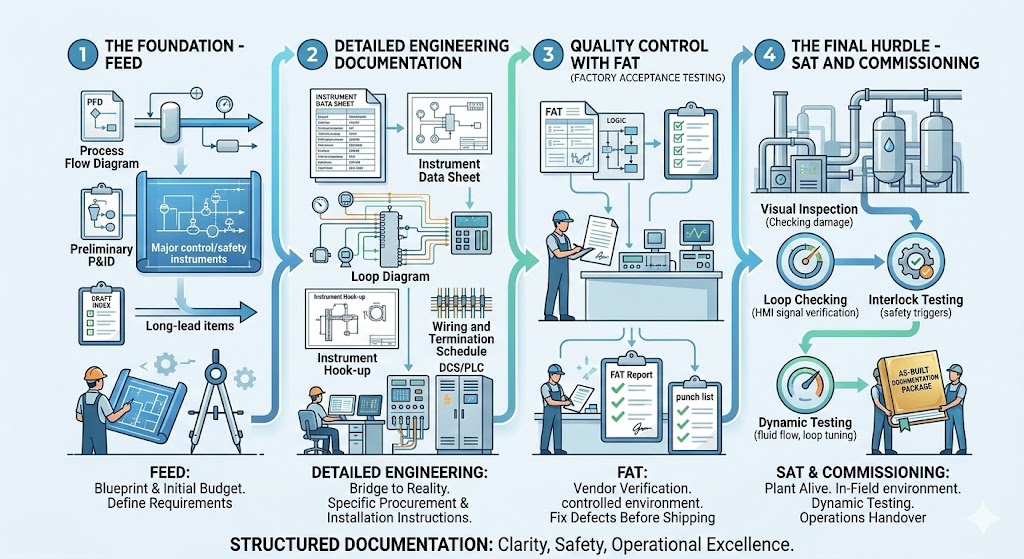
To ensure a project stays on track, engineers must follow a rigorous instrumentation documentation workflow. This journey begins at the conceptual stage and concludes only when the system is fully operational. In this guide, we explore the lifecycle of documentation from FEED through to SAT, ensuring a smooth transition into commissioning.

Phase 1: The Foundation – FEED (Front-End Engineering Design)

The FEED phase is where the project’s technical requirements are defined and the initial budget is established. From a documentation standpoint, this is the “blueprint” phase.

During FEED, the focus is on high-level design. Key documents produced include:

Process Flow Diagrams (PFDs): Highlining the main process stream.

Preliminary Piping and Instrumentation Diagrams (P&IDs): Identifying the major instruments required for control and safety.

Preliminary Instrument Index: A draft list of every instrument expected in the plant.

The goal of FEED is to identify long-lead items and technical challenges before the heavy lifting of the project begins. Mistakes made here ripple through the entire workflow, making accuracy paramount.

Phase 2: Detailed Engineering Documentation

Once the FEED is approved, the project moves into the most labor-intensive stage. Detailed engineering documentation is the bridge between a conceptual design and a physical reality. This phase provides the specific instructions needed for procurement, installation, and wiring.

Critical documents in this phase include:

Instrument Data Sheets: These specify the exact technical parameters of every device—range, material, output signal, and environmental ratings.

Loop Diagrams: Detailed drawings showing the signal path from the field instrument to the control system (DCS/PLC).

Instrument Hook-up Drawings: Instructions on how the instrument should be physically mounted and connected to the process piping.

Wiring and Termination Schedules: Essential for the electricians who will land thousands of wires in junction boxes and control panels.

Without comprehensive detailed engineering documentation, the construction team is essentially working blind, leading to “field fixes” that compromise the integrity of the design.

Phase 3: Quality Control with FAT (Factory Acceptance Testing)

Before any equipment arrives at the job site, it must pass the FAT (Factory Acceptance Test). This is a critical milestone where the vendor demonstrates that the system meets the functional requirements specified in the engineering phase.

During FAT, the documentation workflow shifts from “creation” to “verification.” Engineers use the data sheets and logic diagrams created during detailed engineering to test the hardware and software in a controlled environment.

The FAT Report: This document records every test performed, any failures encountered, and the subsequent “punch list” of items the vendor must fix before shipping.

A successful FAT significantly reduces the risk of discovering major software bugs or hardware defects once the equipment is already installed in the field.

Phase 4: The Final Hurdle – SAT and Commissioning

Once the equipment is installed on-site, the focus shifts to SAT (Site Acceptance Testing). While FAT tests the system in the factory, SAT tests it in its final environment, integrated with the actual field wiring and process equipment.

The Role of SAT

The SAT documentation confirms that the equipment survived transit and was installed correctly. It involves:

Visual Inspections: Checking for physical damage and correct mounting.

Loop Checking: Verifying that a signal from a field transmitter correctly reaches the HMI (Human-Machine Interface).

Interlock Testing: Ensuring safety systems trigger correctly under simulated fault conditions.

Transitioning to Commissioning

Commissioning is the final stage of the instrumentation workflow. This is where the plant is brought to life. The documentation from previous stages—the instrument index, the loop drawings, and the SAT reports—serves as the “as-built” record.

During commissioning, the focus is on dynamic testing: introducing actual process fluids, tuning control loops, and verifying that the plant operates safely and efficiently at scale. The final deliverable is a complete “As-Built” documentation package, which is handed over to the operations and maintenance teams.

Conclusion: Documentation as a Roadmap to Success

The journey from FEED to SAT is complex, but a structured approach to detailed engineering documentation ensures that nothing is left to chance. By maintaining a rigorous workflow, project managers can avoid the pitfalls of disorganized data, ensuring that commissioning is a celebration of a job well done rather than a scramble to fix errors.

In industrial engineering, the paper trail is just as important as the hardware. When your documentation is solid, your project is built on a foundation of clarity, safety, and operational excellence.

Why Poor Instrument Index Structure Delays Commissioning

Discover how a poorly structured instrument index leads to project delays. Learn about tag duplication issues, revision control failures, and real commissioning chaos examples.

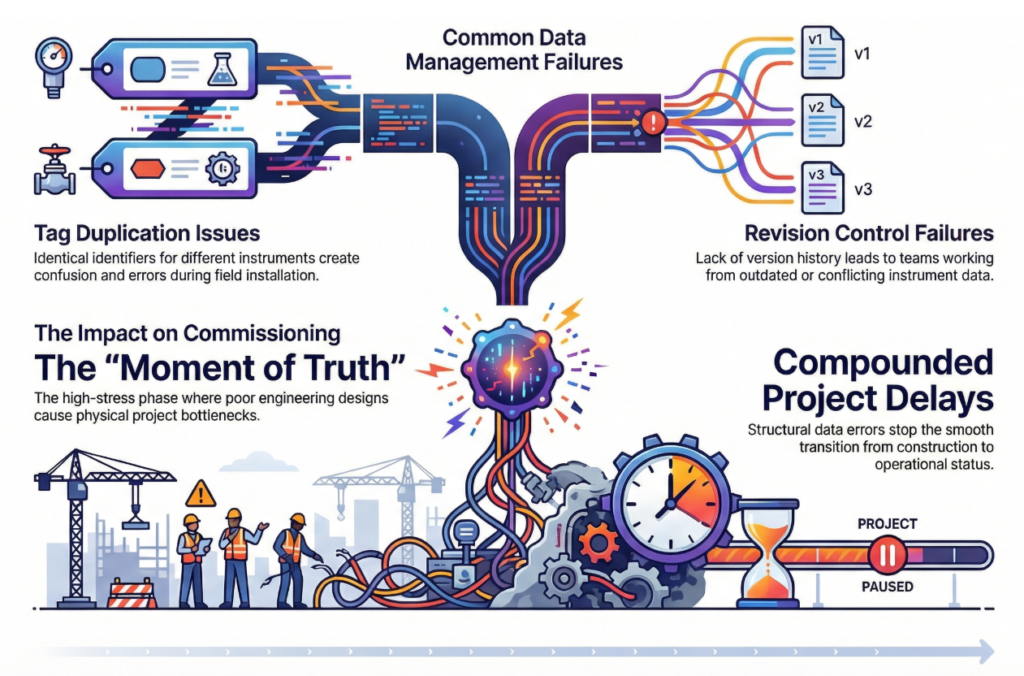
The transition from construction to commissioning is often the most stressful phase of any industrial project. It is the moment of truth where engineering designs meet physical reality. At the heart of this transition lies a single, critical document: the Instrument Index.

When structured correctly, the index is a roadmap to success. When managed poorly, it becomes a primary source of project stagnation. In this article, we explore why a weak data structure leads to significant delays and how to avoid the most common pitfalls.

The Foundation of Commissioning Success

An instrument index is more than just a list of parts; it is the “source of truth” for every sensor, valve, and transmitter on-site. If the data architecture is flawed from the start, the errors cascade through procurement, installation, and finally, loop checking.

Tag Duplication Issues: The Silent Budget Killer

One of the most frequent results of a poor index structure is tag duplication issues. In large-scale projects involving thousands of components, it is remarkably easy for two different instruments to be assigned the same tag number—or for one physical instrument to be assigned two different tags in different documents.

When duplicates exist:

  • Procurement may double-order expensive equipment.
  • Warehouse teams struggle to issue the correct parts to the field.
  • Software engineers face database conflicts when configuring the Distributed Control System (DCS).

Without a rigid naming convention and a centralized database, these duplications often remain hidden until a technician attempts to install a device that “technically” doesn’t exist in the system.

Revision Control Failures and Data Integrity

In the fast-paced environment of engineering, changes are inevitable. However, revision control failures turn these changes into nightmares. If the instrument index is managed via disconnected spreadsheets rather than a controlled database, “Version 5” for the electrical team might be “Version 2” for the process team.

When a field engineer is working off an outdated revision:

  1. They may install an instrument with the wrong pressure rating.
  2. They might wire a device based on a discarded terminal plan.
  3. Loop testing fails because the expected signal range in the control room doesn’t match the physical device.

These failures require hours of “re-work,” which is significantly more expensive than doing it right the first time.

Multi-Discipline Interface Problems

Instrumentation does not exist in a vacuum; it sits at the crossroads of piping, process, electrical, and mechanical engineering. Multi-discipline interface problems arise when the instrument index lacks the necessary fields to bridge these departments.

For example, if the index doesn’t clearly communicate the orifice plate size to the piping team or the power requirements to the electrical team, physical clashes occur. We often see junction boxes placed in inaccessible locations or cable trays that are undersized because the instrument count was not synchronized across disciplines.

Real Commissioning Chaos Examples

To understand the impact, let’s look at some real commissioning chaos examples seen in the field:

  • The “Ghost” Valve: On a major LNG project, a lack of index synchronization led to 50 control valves being manufactured with the wrong fail-safe position. This wasn’t discovered until the loop check phase, delaying the start-up by three weeks while actuators were retrofitted on-site.
  • The Loop Check Logjam: A refinery project suffered a month-long delay because the instrument index didn’t match the P&IDs (Piping and Instrumentation Diagrams). Technicians spent more time hunting for “missing” instruments than actually testing loops, leading to a complete halt in the commissioning schedule.

How to Protect Your Schedule

Avoiding these delays requires a proactive approach to data management. To ensure a smooth commissioning phase, projects should:

  1. Utilize an Integrated Database: Move away from static spreadsheets to a dynamic, multi-user environment (like SPI/InTools).
  2. Enforce Strict Validation: Implement automated checks to prevent tag duplication.
  3. Standardize Early: Define the instrument index structure before a single tag is generated.
  4. Audit Regularly: Perform cross-discipline audits to ensure the index matches the P&IDs and wiring schematics.

Conclusion

A poor instrument index structure is a ticking time bomb. By addressing tag duplication issues, fixing revision control failures, and resolving multi-discipline interface problems, you can prevent the real commissioning chaos examples that derail budgets and timelines.

Invest in your data structure today, or you will pay for it during the final—and most expensive—hours of your project.

Need structured instrument index support?