Instrumentation Symbols: Master ISA-5 and ISA-20

In the world of industrial automation and process control, communication is everything. When an engineer in Texas designs a system for a refinery in Singapore, there can be no room for “creative interpretation.” This is where standardized instrumentation symbols and documentation come into play.

To ensure safety, efficiency, and clarity, the industry relies on standards developed by the International Society of Automation (ISA). Specifically, ISA-5 and ISA-20 serve as the backbone for how instruments are represented visually and documented technically.

The Language of the Plant: Understanding ISA-5

ISA-5 (specifically ISA-5.1) is the global standard for instrumentation symbols and identification. If you have ever looked at a Piping and Instrumentation Diagram (P&ID) and seen circles, squares, and lines with cryptic letter codes, you were looking at ISA-5 in action.

1. Tag Numbers and Identification

Under ISA-5, every instrument is assigned a unique tag number. This tag typically consists of a series of letters and numbers:

  • First Letter: Indicates the measured or initiating variable (e.g., T for Temperature, L for Level, P for Pressure).
  • Succeeding Letters: Indicate the function of the instrument (e.g., IC for Indicator Controller, V for Valve).
  • Loop Number: A numerical suffix that identifies the specific control loop.

For example, a tag labeled TIC-101 tells an operator that the device is a Temperature Indicating Controller belonging to loop 101.

2. Graphic Symbols

ISA-5 defines the “bubbles” or shapes used to represent instruments based on their location and accessibility:

  • Discrete Instruments: A simple circle indicates a field-mounted instrument.
  • Shared Display/Control: A circle inside a square indicates the instrument is part of a Distributed Control System (DCS) or PLC, accessible via an operator console.
  • Computer Function: A hexagon represents a computer-calculated function.

3. Line Symbols

The lines connecting these symbols also carry specific meanings. A solid line represents a process connection (piping), while a dashed line indicates an electrical signal (4-20mA). A line with “double cross-hatches” represents a pneumatic signal.

The Blueprint of Specs: Understanding ISA-20

While ISA-5 provides the visual “map” of the process, ISA-20 provides the “biography” of each instrument. ISA-20 focuses on Instrument Specification Forms (often called Data Sheets).

Once an instrument is identified on a P&ID using ISA-5, the procurement and maintenance teams need to know the specific technical details of that device. This is where ISA-20 comes in.

Why ISA-20 is Critical

A data sheet following ISA-20 standards ensures that all stakeholders—from the design engineer to the vendor—are looking at the same technical requirements. An ISA-20 form typically includes:

  • Operating pressure and temperature ranges.
  • Materials of construction (e.g., Stainless Steel 316).
  • Connection sizes and types.
  • Manufacturer and model numbers.
  • Calibration requirements.

Without the structure of ISA-20, specification sheets would be inconsistent, leading to the purchase of incorrect equipment, which causes costly project delays and potential safety hazards.

Why Standardization Matters

The integration of ISA-5 and ISA-20 into industrial workflows is not just about following rules; it’s about risk mitigation.

1. Safety and Emergency Response

In an emergency, an operator must be able to glance at a screen or a printed diagram and immediately identify which valve to close. Standardized symbols ensure there is no hesitation or confusion during critical moments.

2. Streamlined Maintenance

When a technician is sent to calibrate a transmitter, the ISA-5 tag tells them where it is and what it does, while the ISA-20 data sheet tells them how to calibrate it and what the expected output should be.

3. Interoperability Between Teams

Large-scale projects involve multiple contractors, vendors, and engineers. Using ISA-5 and ISA-20 creates a universal language that allows a seamless handoff from the design phase to the construction and operational phases.

Best Practices for Instrumentation Documentation

To get the most out of these standards, organizations should follow these best practices:

  • Consistency is Key: Ensure that every P&ID and data sheet follows the same version of the ISA standards. Mixing old and new symbols can lead to confusion.
  • Use Modern CAD Software: Most modern Engineering Design Tools (EDT) have built-in libraries for ISA-5 symbols, which automates the tagging process and reduces human error.
  • Regular Audits: Periodically review “As-Built” documentation against the physical plant. Over years of maintenance, “ghost” instruments may appear on drawings that no longer exist in the field.
  • Training: Ensure that all plant personnel, not just engineers, have a basic understanding of how to read ISA-5 symbols.

Conclusion

Mastering ISA-5 and ISA-20 is essential for anyone involved in the design, operation, or maintenance of industrial processes. ISA-5 provides the visual framework needed to understand the “what” and “where” of plant instrumentation, while ISA-20 provides the technical depth to understand the “how.” Together, they form a robust system of documentation that ensures industrial plants run safely, efficiently, and predictably.
Instrument Tagging Philosophy: Are you doing it right?

In the world of industrial automation and process control, an instrument tag is more than just a label on a data sheet or a physical plate wired to a transmitter. It is the “DNA” of the plant. A robust instrument tagging philosophy ensures that every sensor, valve, and controller can be uniquely identified, located, and maintained throughout its lifecycle.

As a Senior Instrumentation Engineer, I have seen firsthand how a lack of standardization in the early stages of a project can lead to catastrophic delays during commissioning and maintenance nightmares during operations. To prevent this, we must build systems that are logical, consistent, and capable of providing support for large-scale projects.

The Foundation of Tag Naming: Why It Matters

Tag naming is the process of assigning a unique alphanumeric code to an instrument. This code communicates the instrument’s function, its location within the process, and its relationship to other components. Without a clear philosophy, you end up with “Frankenstein” systems where different areas of the same plant use different naming conventions.

A logical tagging system provides:

  1. Seamless Communication: Engineers, operators, and maintenance technicians all speak the same language.
  2. Efficient Data Management: Simplified integration with Asset Management Systems (AMS) and Computerized Maintenance Management Systems (CMMS).
  3. Faster Troubleshooting: When an alarm trips, the tag should immediately tell the operator what the device is and where it is located.

Leveraging Industrial Standards

To achieve true standardization, we don’t need to reinvent the wheel. Several industrial standards provide the framework for professional tagging.

ISA 5.1: The Global Benchmark

The International Society of Automation (ISA) 5.1 standard is the most widely used convention in the oil and gas and chemical industries. It uses a combination of letters (to define the measured variable and function) and numbers (to define the loop). For example, a “PT-101” is a Pressure Transmitter in loop 101.

KKS (Kraftwerk-Kennzeichensystem)

For power generation and complex heavy industries, the KKS system is often the gold standard. Unlike the flatter structure of ISA, KKS is a hierarchical system that identifies the plant level, the system level, and the component level. This hierarchy is essential for support for large-scale projects where thousands of identical components exist across different units.

Building a Scalable Philosophy

When designing a tagging philosophy for a new facility, scalability is the most critical factor. A system that works for a small pilot plant will often fail when applied to a multi-train refinery.

1. Hierarchical Structuring

A scalable tag should follow a “General to Specific” logic. A common structure includes:

  • Unit/Area Code: (e.g., 10 for Crude Distillation)
  • Equipment Type: (e.g., FV for Flow Valve)
  • Loop Number: (e.g., 5001)
  • Suffix: (e.g., A/B for redundant systems)

2. Consistency Across Documentation

The tag must be identical across the P&ID (Piping and Instrumentation Diagram), the Instrument Index, the wiring diagrams, and the HMI (Human Machine Interface). Any discrepancy—even a misplaced hyphen—can lead to procurement errors and safety risks.

3. Future-Proofing

Always leave “gaps” in your numbering sequences. If you number your loops 101, 102, and 103, you have no room to add a new instrument between them later. Using increments of 10 (100, 110, 120) allows for future expansion without breaking the logical flow.

Challenges in Large-Scale Projects

Providing support for large-scale projects requires a centralized “Tag Registry.” In projects involving multiple EPC (Engineering, Procurement, and Construction) contractors, a lack of a unified tagging philosophy leads to duplicate tags.

To mitigate this, the Lead Instrumentation Engineer must establish a Tagging Master Specification at the FEED (Front-End Engineering Design) stage. This document should dictate:

  • Character length limits.
  • Mandatory use of delimiters (dashes, underscores).
  • Prohibited characters (to avoid software glitches in DCS/PLC systems).

Conclusion: The ROI of a Strong Philosophy

Developing a comprehensive instrument tagging philosophy requires an upfront investment of time and discipline. However, the return on investment is realized through reduced engineering hours, faster commissioning, and enhanced plant safety.

By adhering to industrial standards like ISA 5.1 or KKS and prioritizing standardization, you create a digital twin foundation that will serve the plant for decades. Remember: a tag is not just a name; it is a vital piece of information that keeps the industrial world turning.

Are you planning a new facility or upgrading an existing one? Ensure your tagging system is ready for the challenge. Contact our engineering team today to learn more about implementing scalable industrial standards.

How Brownfield Projects Fail Due to Documentation Gaps

In the world of industrial automation, a “Greenfield” project is a dream—a blank slate where every wire, tag, and logic block is documented from scratch. However, the reality for most commissioning engineers is the “Brownfield” project. These migrations involve upgrading legacy systems that have been running for decades.

While the goal of a Brownfield Control System Migration is improved efficiency and modern capabilities, many of these projects fail before the first loop is even tuned. The culprit? Documentation gaps. When the digital record doesn’t match the physical plant, the project is headed for a costly disaster.

The “As-Built” Myth: Old Drawings vs Field Reality

The most common point of failure in any migration is the reliance on outdated documentation. On paper, the plant has a set of “As-Built” drawings. In reality, these documents are often “As-Designed” from twenty years ago.

The gap between old drawings vs field reality is created by years of “midnight engineering.” When a sensor fails at 3 AM on a Tuesday, a maintenance technician might bypass a relay or move a wire to a spare I/O point to keep production running. If that change isn’t redlined and updated in the master CAD files, that discrepancy remains hidden until the migration begins.

During a cutover, discovering that a critical interlock isn’t where the drawing says it is can stop a project in its tracks, leading to expensive downtime and safety risks.

The Tagging Nightmare: Legacy Tag Mismatch

Software migration is more than just importing a database from an old PLC to a new DCS. One of the most significant documentation risks is the legacy tag mismatch.

Over decades, naming conventions evolve. What was once PUMP*101*START in the old code might be referenced as P*101*ST in the HMI, while the physical terminal block is labeled P101-S. When engineers attempt to map these tags to a new system without a 1:1 verified cross-reference, the communication breaks.

A legacy tag mismatch results in:

  • HMI screens displaying “Comm Fail” or incorrect data.
  • Alarms failing to trigger during critical events.
  • Automated sequences hanging because they are looking for a status bit that no longer exists under the old name.

The Silent Killer: Hidden IO Changes

If the software is the brain, the I/O is the nervous system. Hidden IO changes are the silent killers of Brownfield projects. These are the physical modifications—splitters, signal conditioners, or local overrides—that were never added to the I/O list.

During a Brownfield Control System Migration, the new controller is programmed based on the existing I/O list. If that list is missing 10% of the actual field connections, the new system will be blind to those inputs. Commissioning engineers often find themselves tracing wires through packed cable trays in the middle of a shutdown, desperately trying to figure out why a valve won’t move, only to find a hidden interlock relay buried in a junction box.

Missing the Mark: Migration Freeze Windows

In industrial environments, time is money. Most migrations are scheduled during “turnarounds” or migration freeze windows. These are narrow periods where production is halted, and the engineering team has a set number of hours to swap the old system for the new one.

Documentation gaps turn these windows into nightmares. If the team spends 48 hours of a 72-hour window troubleshooting old drawings vs field reality, the project will likely exceed the window. This leads to:

  1. Production Overruns: Every hour past the window costs the company thousands (or millions) in lost revenue.
  2. Rushed Commissioning: To meet the deadline, safety checks and loop tests are often cut short, leading to long-term reliability issues.

How to Mitigate Documentation Risks

To prevent failure, a Brownfield project must prioritize “Data Integrity” over “Data Migration.”

  • Physical Audits: Never trust the drawings. Perform a physical “walk-down” of every cabinet and I/O point before the design phase ends.
  • Loop Checking Early: Use a pre-migration shutdown to perform loop checks and verify that the physical wiring matches the software tags.
  • Digital Twins: Create a virtual representation of the system to test the new logic against the old tag structures before arriving on-site.
  • Redline Culture: Encourage maintenance teams to document every change, no matter how small, in the years leading up to a migration.

Conclusion

Brownfield projects don’t fail because the new technology is bad; they fail because the old information is wrong. By identifying hidden IO changes, resolving legacy tag mismatches, and acknowledging the discrepancy between old drawings vs field reality, engineers can navigate the complexities of a Brownfield Control System Migration successfully.

Don’t let a missing redline be the reason your next project fails. Invest in documentation today, or pay for it during the commissioning window.

How to Structure a Cause & Effect Matrix for IEC 61511 Compliance

In the world of functional safety, clarity is the ultimate safeguard. When designing Safety Instrumented Systems (SIS), the transition from a Hazard and Operability Study (HAZOP) to actual logic implementation can be fraught with errors. This is where the Cause & Effect matrix becomes an indispensable tool.

For engineers working within the framework of IEC 61511, a well-structured matrix isn’t just a drawing; it is a fundamental part of the Safety Requirements Specification (SRS). In this guide, we will explore the good practices for Cause & Effect development & review to ensure your facility remains safe and compliant.

Why a Robust Cause & Effect Matrix is Vital for Process Safety

A Cause & Effect (C&E) matrix provides a clear, tabular representation of the logic that links sensing elements (Causes) to final elements like valves or motors (Effects). Under IEC 61511, the functional safety lifecycle demands that logic is not only functional but also verifiable and maintainable.

Without a structured C&E, the risk of “logic creep” increases—where the intended safety function is lost in a sea of complex programming. By prioritizing a clean structure, you enhance process safety by making the safety logic understandable for operators, maintenance technicians, and functional safety auditors alike.

Key Components of a Compliant Cause & Effect Matrix

To achieve IEC 61511 compliance, your matrix must be more than a simple grid. It needs to contain specific metadata and functional details.

1. Identifying the Causes (Inputs)

The “Cause” side of the matrix should clearly list the input devices. Good practices dictate that you include:

  • Tag Numbers: Precise identification of the instrument (e.g., PT-101).
  • Trip Setpoints: The exact process value that triggers the safety action.
  • Voting Logic: Specification of 1oo1, 1oo2, or 2oo3 configurations.
  • Description: A brief explanation of the hazard being mitigated (e.g., “High Pressure in Vessel A”).

2. Defining the Effects (Outputs)

The “Effect” side details what happens when a trip occurs. This should include:

  • Final Element Tags: (e.g., XV-101 or Pump P-201).
  • Fail-Safe State: Clearly state whether the valve should Close (FC), Open (FO), or the motor should De-energize.
  • Timing Requirements: Any necessary delays or sequencing requirements.

3. The Logic Intersection

The intersection points (often marked with an “X”) define the relationship. For complex systems, different symbols may be used to represent “Energize to Trip” vs. “De-energize to Trip” logic, provided a clear legend is included.

Good Practices for Cause & Effect Development & Review

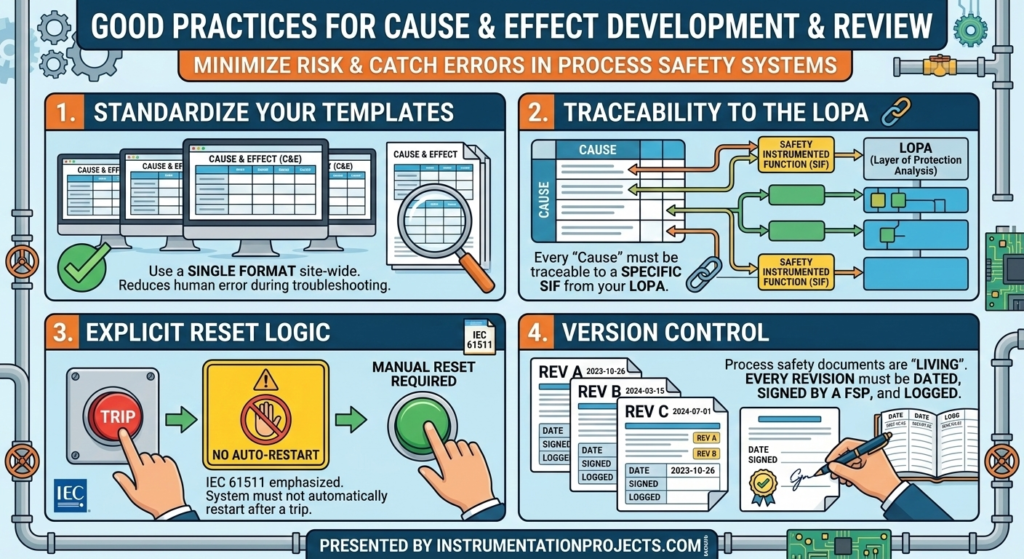
The Cause & Effect development & review process is where most errors are caught—or unfortunately, where they are sometimes introduced. Following these industry-standard good practices will minimize risk:

  • Standardize Your Templates: Ensure that every C&E matrix across your site follows the same format. This reduces human error during high-stress troubleshooting.
  • Traceability to the LOPA: Every “Cause” in your matrix should be traceable back to a specific Safety Instrumented Function (SIF) identified in your Layer of Protection Analysis (LOPA).
  • Explicit Reset Logic: IEC 61511 emphasizes that a system should not automatically restart after a trip. Your matrix should clearly indicate where manual resets are required.
  • Version Control: Process safety documents are living documents. Ensure every revision is dated, signed by a Functional Safety Professional, and logged.

The Importance of Review Support

Developing the matrix is only half the battle; the review phase is where the logic is validated against real-world operations. Effective review support involves bringing together a multidisciplinary team, including:

  • Process Engineers: To verify the trip setpoints make sense for the chemistry/physics of the process.
  • Control Systems Engineers: To ensure the logic can be physically implemented in the Logic Solver (PLC/DCS).
  • Operations Personnel: To confirm that the “Effects” will not create secondary hazards (e.g., causing a surge elsewhere in the plant).

During these reviews, it is helpful to use a “Checklist approach” to ensure no SIF has been overlooked and that the bypass/maintenance overrides are properly accounted for.

Common Pitfalls to Avoid

Even experienced teams can stumble during Cause & Effect development & review. Avoid these common mistakes:

  1. Over-complicating the Matrix: If a matrix is too large, it becomes unreadable. Break down complex plants into smaller, unit-based matrices.
  2. Vague Descriptions: Using terms like “Shut down system” is too broad. Be specific: “Close XV-101 and Trip Pump P-101.”
  3. Neglecting the “Notes” Section: Use the notes section to explain complex interlocks or non-standard voting logic.

Conclusion

Structuring a Cause & Effect matrix for IEC 61511 compliance is a cornerstone of effective process safety management. By following good practices in documentation and ensuring robust review support, you create a safer environment and a more reliable SIS.

Remember, the goal of a C&E matrix is to bridge the gap between abstract safety requirements and concrete engineering actions. Keep it clear, keep it consistent, and always prioritize the safety of the personnel and the environment.

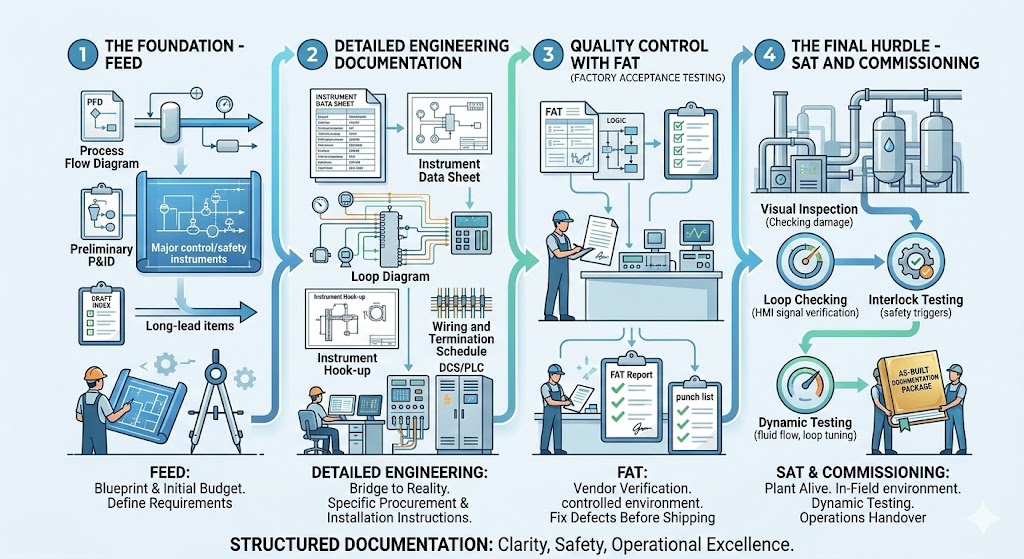
Instrumentation Documentation Workflow: FEED to SAT

In the world of industrial automation and process control, instrumentation serves as the “nervous system” of a plant. However, even the most advanced sensors and controllers are only as effective as the paperwork supporting them. A fragmented documentation process leads to costly delays, safety hazards, and massive headaches during the final stages of a project.

To ensure a project stays on track, engineers must follow a rigorous instrumentation documentation workflow. This journey begins at the conceptual stage and concludes only when the system is fully operational. In this guide, we explore the lifecycle of documentation from FEED through to SAT, ensuring a smooth transition into commissioning.

Phase 1: The Foundation – FEED (Front-End Engineering Design)

The FEED phase is where the project’s technical requirements are defined and the initial budget is established. From a documentation standpoint, this is the “blueprint” phase.

During FEED, the focus is on high-level design. Key documents produced include:

Process Flow Diagrams (PFDs): Highlining the main process stream.

Preliminary Piping and Instrumentation Diagrams (P&IDs): Identifying the major instruments required for control and safety.

Preliminary Instrument Index: A draft list of every instrument expected in the plant.

The goal of FEED is to identify long-lead items and technical challenges before the heavy lifting of the project begins. Mistakes made here ripple through the entire workflow, making accuracy paramount.

Phase 2: Detailed Engineering Documentation

Once the FEED is approved, the project moves into the most labor-intensive stage. Detailed engineering documentation is the bridge between a conceptual design and a physical reality. This phase provides the specific instructions needed for procurement, installation, and wiring.

Critical documents in this phase include:

Instrument Data Sheets: These specify the exact technical parameters of every device—range, material, output signal, and environmental ratings.

Loop Diagrams: Detailed drawings showing the signal path from the field instrument to the control system (DCS/PLC).

Instrument Hook-up Drawings: Instructions on how the instrument should be physically mounted and connected to the process piping.

Wiring and Termination Schedules: Essential for the electricians who will land thousands of wires in junction boxes and control panels.

Without comprehensive detailed engineering documentation, the construction team is essentially working blind, leading to “field fixes” that compromise the integrity of the design.

Phase 3: Quality Control with FAT (Factory Acceptance Testing)

Before any equipment arrives at the job site, it must pass the FAT (Factory Acceptance Test). This is a critical milestone where the vendor demonstrates that the system meets the functional requirements specified in the engineering phase.

During FAT, the documentation workflow shifts from “creation” to “verification.” Engineers use the data sheets and logic diagrams created during detailed engineering to test the hardware and software in a controlled environment.

The FAT Report: This document records every test performed, any failures encountered, and the subsequent “punch list” of items the vendor must fix before shipping.

A successful FAT significantly reduces the risk of discovering major software bugs or hardware defects once the equipment is already installed in the field.

Phase 4: The Final Hurdle – SAT and Commissioning

Once the equipment is installed on-site, the focus shifts to SAT (Site Acceptance Testing). While FAT tests the system in the factory, SAT tests it in its final environment, integrated with the actual field wiring and process equipment.

The Role of SAT

The SAT documentation confirms that the equipment survived transit and was installed correctly. It involves:

Visual Inspections: Checking for physical damage and correct mounting.

Loop Checking: Verifying that a signal from a field transmitter correctly reaches the HMI (Human-Machine Interface).

Interlock Testing: Ensuring safety systems trigger correctly under simulated fault conditions.

Transitioning to Commissioning

Commissioning is the final stage of the instrumentation workflow. This is where the plant is brought to life. The documentation from previous stages—the instrument index, the loop drawings, and the SAT reports—serves as the “as-built” record.

During commissioning, the focus is on dynamic testing: introducing actual process fluids, tuning control loops, and verifying that the plant operates safely and efficiently at scale. The final deliverable is a complete “As-Built” documentation package, which is handed over to the operations and maintenance teams.

Conclusion: Documentation as a Roadmap to Success

The journey from FEED to SAT is complex, but a structured approach to detailed engineering documentation ensures that nothing is left to chance. By maintaining a rigorous workflow, project managers can avoid the pitfalls of disorganized data, ensuring that commissioning is a celebration of a job well done rather than a scramble to fix errors.

In industrial engineering, the paper trail is just as important as the hardware. When your documentation is solid, your project is built on a foundation of clarity, safety, and operational excellence.

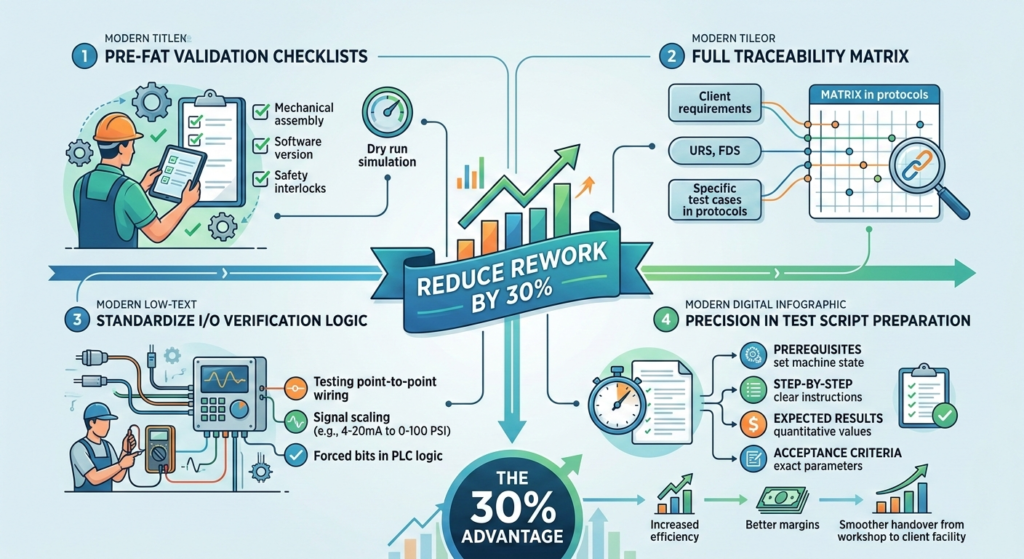
FAT & SAT Documentation: How to Reduce Rework by 30%

In the world of industrial automation and large-scale manufacturing, the transition from a supplier’s workshop to a client’s facility is a high-stakes phase. Factory Acceptance Testing (FAT) and Site Acceptance Testing (SAT) are the critical milestones that ensure a system meets its design specifications.

However, many projects suffer from a “death by a thousand cuts” during these phases, where minor errors lead to significant rework, blown budgets, and missed deadlines. Industry data suggests that by optimizing your documentation and validation processes, you can reduce rework by as much as 30%.

Here is how to streamline your FAT & SAT documentation for maximum efficiency.

The High Cost of Inadequate Documentation

Rework during the commissioning phase isn’t just a technical hurdle; it’s a financial drain. When a system fails a test during FAT, the engineers must diagnose, fix, and re-test. If that failure isn’t caught until SAT—when the machine is already at the client’s site—the costs of travel, downtime, and emergency shipping can skyrocket.

The secret to avoiding this lies in proactive documentation. By shifting the focus from “testing to find bugs” to “validating a ready system,” teams can ensure a smooth handover.

1. Eliminate Surprises with Pre-FAT Validation Checklists

The most common reason for FAT failure is arriving at the test day with a system that hasn’t been internally vetted. Implementing rigorous pre-FAT validation checklists is the single most effective way to reduce rework.

A pre-FAT checklist acts as a “dry run.” It ensures that:

  • All mechanical components are assembled and torqued.
  • Software versions are finalized and backed up.
  • Safety interlocks are functioning.
  • The physical appearance matches the General Arrangement (GA) drawings.

By checking these boxes internally before the client arrives, you ensure that the formal FAT is a demonstration of success rather than a troubleshooting session.

2. Ensure Full Coverage with a Traceability Matrix

How do you prove that every single client requirement has been met? Without a traceability matrix, it is easy for a small functional requirement to slip through the cracks, only to be discovered during the final SAT.

A traceability matrix maps every User Requirement Specification (URS) and Functional Design Specification (FDS) to a specific test case in your FAT or SAT protocol.

  • Bidirectional visibility: If a requirement changes, you immediately know which test scripts need updating.
  • Gap analysis: It highlights requirements that currently have no corresponding test, preventing “missing feature” rework at the site.

3. Standardize I/O Verification Logic

One of the most time-consuming aspects of commissioning is hardware-to-software communication. Errors in I/O verification logic—such as swapped wires or incorrectly scaled sensors—are notorious for causing delays.

To reduce rework, your documentation should include a dedicated I/O checkout sheet that validates the logic before functional testing begins. This includes:

  • Point-to-point wiring checks: Ensuring the physical wire matches the electrical schematic.
  • Signal scaling: Verifying that a 4-20mA signal correctly translates to the intended engineering units (e.g., 0-100 PSI) in the PLC logic.
  • Forced bit testing: Systematically forcing inputs and outputs to ensure the software responds according to the design logic.

Fixing these “low-level” errors early ensures that the “high-level” functional testing proceeds without interruption.

4. Precision in Test Script Preparation

A test is only as good as the script that guides it. Vague documentation leads to subjective results, which often results in the client requesting rework based on a misunderstanding of the system’s capabilities.

Effective test script preparation requires a granular approach. Each script should include:

  • Prerequisites: What state must the machine be in before the test starts?
  • Step-by-step instructions: Clear actions for the operator.
  • Expected results: Quantitative values or specific visual cues that define a “Pass.”
  • Acceptance criteria: The exact parameters that satisfy the requirement.

When test scripts are prepared with this level of detail, it removes ambiguity. If the machine does exactly what the script says, and the client signed off on the script, the “rework” conversation is replaced by an “out-of-scope” conversation.

Conclusion: The 30% Advantage

Reducing rework by 30% is not about working faster; it is about working smarter through documentation. By utilizing pre-FAT validation checklists, maintaining a rigorous traceability matrix, verifying I/O verification logic early, and putting effort into test script preparation, you create a “right-the-first-time” culture.

High-quality documentation transforms FAT and SAT from stressful hurdles into professional demonstrations of quality, ultimately protecting your profit margins and your reputation.

Instrumentation Data Management: Excel vs. Engineering Databases

In the world of Electrical and Instrumentation (E&I) engineering, data is the foundation of every successful project. From the initial Instrument Index to complex loop diagrams and data sheets, managing thousands of tag numbers requires a robust strategy. Historically, Microsoft Excel has been the “Swiss Army Knife” of the industry, but as projects grow in complexity, many firms are migrating toward dedicated engineering databases like SmartPlant Instrumentation (SPI) or AVEVA Instrumentation.

The question for project managers and lead engineers remains: Which tool is right for your project? In this article, we explore the trade-offs between spreadsheets and databases, focusing on efficiency, scalability, and data integrity.

When Excel is Sufficient

Despite the rise of sophisticated software, Microsoft Excel remains a staple in instrumentation departments. There are specific scenarios when Excel is sufficient for managing instrumentation data:

  1. Small-Scale Projects: For minor brownfield modifications or small skid packages with fewer than 200–300 tags, the overhead of setting up a relational database often outweighs the benefits.
  2. Front-End Engineering Design (FEED): During the early stages of a project, data is fluid. Excel allows for rapid prototyping, quick bulk edits, and easy sharing with stakeholders who may not have access to specialized engineering software.
  3. Limited Budgets and Resources: Engineering databases require significant investment in licenses and specialized personnel (Database Administrators). If the project budget or the team’s technical expertise is limited, a well-structured Excel template can get the job done.
  4. One-Off Data Collection: For simple site audits or equipment lists where relational links (like cable schedules to junction boxes) aren’t the primary focus, a spreadsheet is often the fastest tool available.

When Database Systems are Needed

As a project scales, the limitations of a flat-file system like Excel become apparent. You know when database systems are needed when the “Single Source of Truth” begins to fracture.

1. Complex Data Relationships

Instrumentation data is inherently relational. A single tag is linked to a datasheet, a loop drawing, a junction box, a Marshalling Cabinet, and an I/O card. Excel struggles to maintain these links. In a database, changing a tag name once updates it across every associated document automatically.

2. Multi-User Collaboration

Excel “File in Use” errors are a bottleneck for large teams. Engineering databases allow dozens of engineers and designers to work simultaneously on the same dataset without risk of overwriting each other’s work.

3. Lifecycle Management

For large EPC (Engineering, Procurement, and Construction) projects, the data must eventually be handed over to the owner-operator. A database provides a structured format that integrates easily into Asset Management Systems (AMS) and Maintenance Management Systems (CMMS), providing value long after the design phase is over.

Version Control Best Practices

Regardless of the tool you choose, data is only as good as its last revision. Implementing version control best practices is essential to prevent costly field errors.

  • For Excel Users: Avoid naming files “IndexFinalv2Updated.” Instead, use a standardized naming convention with ISO dates (YYYY-MM-DD) and maintain a “Revision History” tab within the workbook.
  • For Database Users: Utilize the software’s built-in revision management tools. Ensure that “frozen” data (data sent for construction) is locked to prevent accidental modifications.
  • Audit Trails: Always log who changed what and when. In a database, this is automated. In Excel, this requires strict discipline and manual entry.

The Importance of Change Management

In instrumentation, a change in a process condition (like a pressure increase) can trigger a cascade of updates—from the transmitter range to the alarm setpoints in the DCS. Effective change management ensures these ripples are captured across the entire project.

If you are using Excel, change management relies heavily on manual cross-checking, which is prone to human error. Database systems, however, utilize “Management of Change” (MOC) workflows. These workflows can flag inconsistencies—for example, alerting an engineer if a cable is assigned to a deleted instrument.

To maintain integrity during changes:

  1. Define a Clear Workflow: Establish who has the authority to approve changes to the Instrument Index.
  2. Impact Analysis: Before implementing a change, identify every document (Loop, Hook-up, Datasheet) that will be affected.
  3. Communication: Use automated notifications or regular coordination meetings to ensure the Electrical, Process, and Piping teams are aligned with the latest Instrumentation data.

Conclusion

Choosing between Excel and an engineering database isn’t about which tool is “better” in a vacuum; it’s about choosing the right tool for the project’s scale and complexity. When Excel is sufficient, it offers unmatched flexibility and speed. However, when database systems are needed, they provide the structural integrity and multi-user environment required for modern, large-scale engineering.

By following version control best practices and maintaining a rigorous approach to change management, E&I engineers can ensure that their data remains an asset rather than a liability, leading to safer and more efficient project execution.

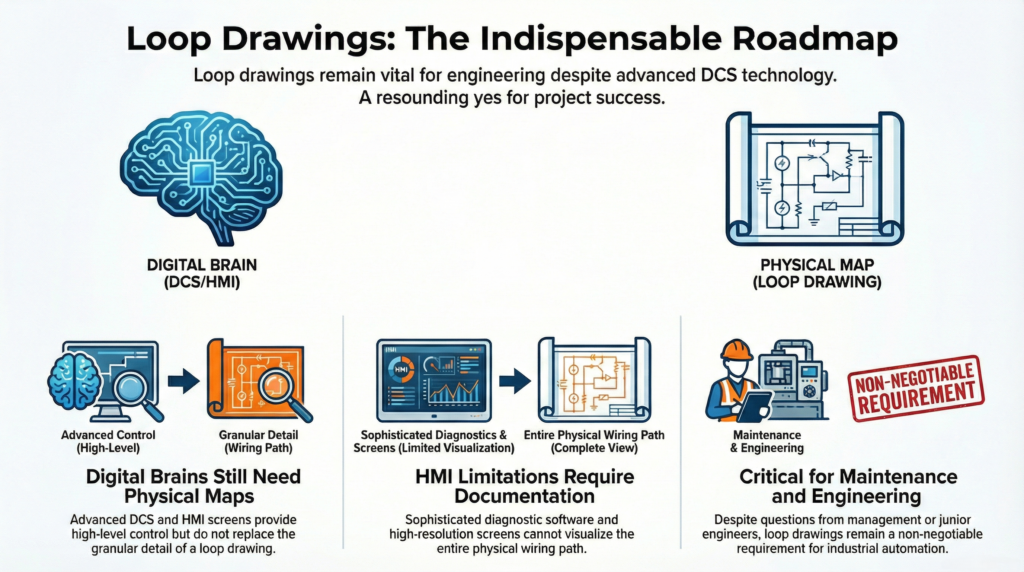
Loop Drawings: Are They Still Critical in a DCS World?

In the modern era of industrial automation, the Distributed Control System (DCS) is the brain of the plant. With high-resolution HMI screens, sophisticated diagnostic software, and digital fieldbus protocols, some managers and junior engineers have begun to ask: “Do we really still need loop drawings?”

The short answer is a resounding yes. While the DCS manages the logic and the data, the physical reality of the plant—the wires, terminal blocks, barriers, and junctions—remains analog and physical.

As an E&I engineer, I have seen firsthand how the absence of accurate loop drawings can turn a minor instrument failure into a multi-hour production outage. Here is why loop drawings remain the “DNA” of your facility and how to manage the documentation burden in today’s lean engineering environment.


The Bridge Between Software and Reality

A DCS can tell you that a 4-20mA signal is out of range, but it cannot tell you that a technician accidentally bumped a loose wire in Junction Box 42.

Loop drawings (typically following the ISA-5.4 standard) provide a detailed roadmap of the signal path from the field instrument to the I/O card. This includes:

  • Terminal numbers in the field junction box.
  • Multi-pair cable identification.
  • Marshalling cabinet terminations.
  • Intrinsic safety (IS) barrier details.
  • DCS I/O channel assignments.

Without this “map,” troubleshooting is reduced to guesswork. In a high-stakes environment, guessing is not a strategy; it is a liability.

Navigating Staff Overload Cycles

One of the primary reasons loop drawings fall out of date is the reality of staff overload cycles. In many plants, the E&I department is sized for “steady-state” maintenance. When the plant is running smoothly, documentation is manageable.

However, when a major failure occurs or a small optimization project is launched, the engineering team is stretched thin. During these cycles, “redlining” a drawing is often the first task to be deferred. Over several years, these deferred updates accumulate, rendering the plant’s documentation library untrustworthy. When the drawings don’t match the field reality, safety risks increase and troubleshooting time doubles.

Managing Temporary Project Peaks

Capital projects and plant turnarounds create massive temporary project peaks in documentation requirements. A single project might add 200 new loops to the system. Producing, checking, and approving 200 individual drawings requires hundreds of man-hours that most internal teams simply do not have.

During these peaks, the pressure to “just get the plant running” often leads to a backlog of “as-built” drawings that never actually get built. This creates a technical debt that the maintenance team will eventually have to pay—usually at 2:00 AM during an emergency shutdown.

The Cost of Permanent Hires vs. Scalable Solutions

From a management perspective, the cost of permanent hires is a significant barrier to maintaining perfect documentation. Hiring a full-time E&I designer or CAD operator is a long-term financial commitment that includes salary, benefits, training, and software licensing.

For many facilities, the workload for documentation is “lumpy.” There isn’t enough work to justify a new full-time employee year-round, but there is too much work for the existing staff to handle during upgrades. This leads to a cycle of “documentation decay,” where the quality of the plant’s records slowly erodes because the cost of maintaining them seems too high.

Modern Solutions: Remote Documentation Workflows

To bridge the gap between the need for accurate drawings and the constraints of a lean workforce, many forward-thinking E&I departments are adopting remote documentation workflows.

By leveraging remote engineering services, plants can scale their documentation efforts up or down based on current needs. Here is how it works:

  1. Field Redlines: Plant technicians mark up existing drawings or take photos of new installations.
  2. Cloud Collaboration: These redlines are uploaded to a secure server.
  3. Drafting & QA: Remote E&I designers update the CAD files, ensuring they meet plant standards.
  4. Final Review: The plant engineer performs a final digital sign-off.

This approach allows facilities to handle temporary project peaks without the long-term cost of permanent hires. It ensures that even during staff overload cycles, the “as-built” integrity of the plant is maintained.


Conclusion

In a DCS world, loop drawings are more than just paper; they are a critical safety and reliability tool. They are the only document that links the digital bit in the controller to the physical bolt in the field.

By recognizing the challenges of staffing and utilizing modern remote documentation workflows, E&I managers can ensure their facility remains safe, compliant, and easy to maintain—no matter how complex the DCS becomes.

Are your loop drawings up to date? Don’t wait for a shutdown to find out. Contact our E&I engineering team today to learn how we can help you clear your documentation backlog.

Full loop package development services available

Contact Us

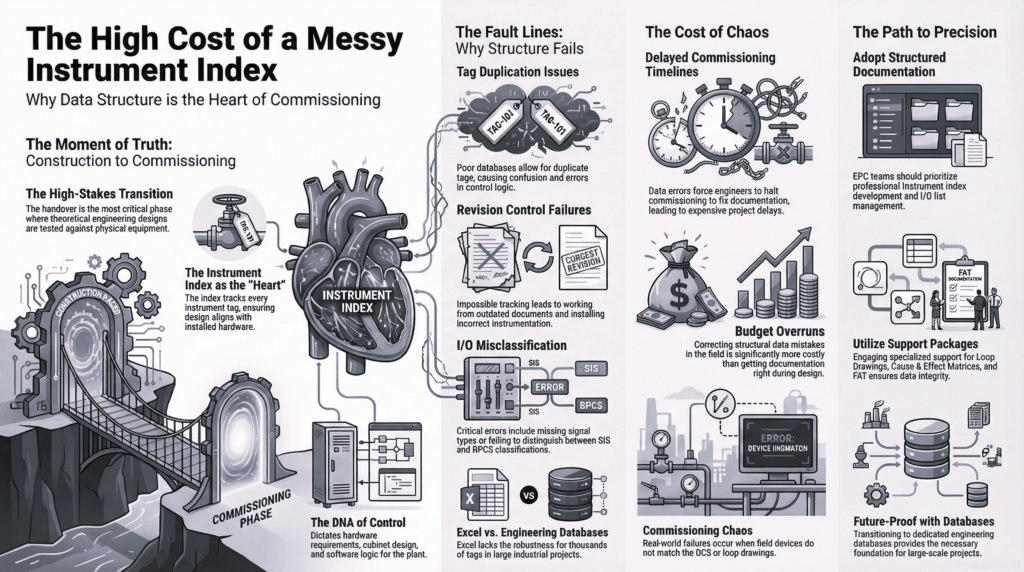
Why Poor Instrument Index Structure Delays Commissioning

Discover how a poorly structured instrument index leads to project delays. Learn about tag duplication issues, revision control failures, and real commissioning chaos examples.

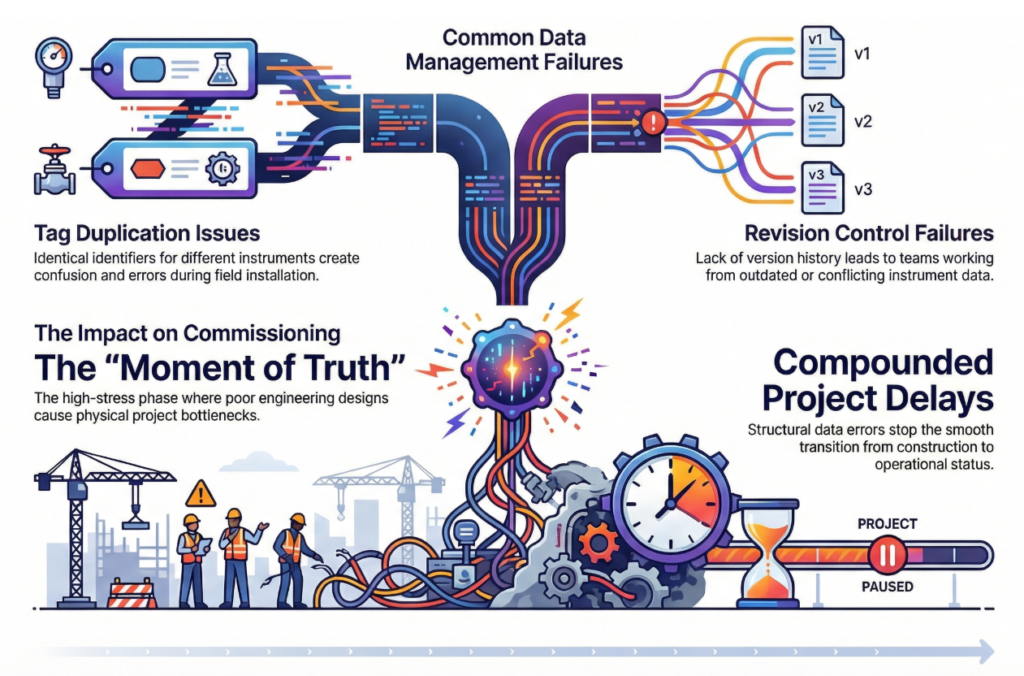
The transition from construction to commissioning is often the most stressful phase of any industrial project. It is the moment of truth where engineering designs meet physical reality. At the heart of this transition lies a single, critical document: the Instrument Index.

When structured correctly, the index is a roadmap to success. When managed poorly, it becomes a primary source of project stagnation. In this article, we explore why a weak data structure leads to significant delays and how to avoid the most common pitfalls.

The Foundation of Commissioning Success

An instrument index is more than just a list of parts; it is the “source of truth” for every sensor, valve, and transmitter on-site. If the data architecture is flawed from the start, the errors cascade through procurement, installation, and finally, loop checking.

Tag Duplication Issues: The Silent Budget Killer

One of the most frequent results of a poor index structure is tag duplication issues. In large-scale projects involving thousands of components, it is remarkably easy for two different instruments to be assigned the same tag number—or for one physical instrument to be assigned two different tags in different documents.

When duplicates exist:

  • Procurement may double-order expensive equipment.
  • Warehouse teams struggle to issue the correct parts to the field.
  • Software engineers face database conflicts when configuring the Distributed Control System (DCS).

Without a rigid naming convention and a centralized database, these duplications often remain hidden until a technician attempts to install a device that “technically” doesn’t exist in the system.

Revision Control Failures and Data Integrity

In the fast-paced environment of engineering, changes are inevitable. However, revision control failures turn these changes into nightmares. If the instrument index is managed via disconnected spreadsheets rather than a controlled database, “Version 5” for the electrical team might be “Version 2” for the process team.

When a field engineer is working off an outdated revision:

  1. They may install an instrument with the wrong pressure rating.
  2. They might wire a device based on a discarded terminal plan.
  3. Loop testing fails because the expected signal range in the control room doesn’t match the physical device.

These failures require hours of “re-work,” which is significantly more expensive than doing it right the first time.

Multi-Discipline Interface Problems

Instrumentation does not exist in a vacuum; it sits at the crossroads of piping, process, electrical, and mechanical engineering. Multi-discipline interface problems arise when the instrument index lacks the necessary fields to bridge these departments.

For example, if the index doesn’t clearly communicate the orifice plate size to the piping team or the power requirements to the electrical team, physical clashes occur. We often see junction boxes placed in inaccessible locations or cable trays that are undersized because the instrument count was not synchronized across disciplines.

Real Commissioning Chaos Examples

To understand the impact, let’s look at some real commissioning chaos examples seen in the field:

  • The “Ghost” Valve: On a major LNG project, a lack of index synchronization led to 50 control valves being manufactured with the wrong fail-safe position. This wasn’t discovered until the loop check phase, delaying the start-up by three weeks while actuators were retrofitted on-site.
  • The Loop Check Logjam: A refinery project suffered a month-long delay because the instrument index didn’t match the P&IDs (Piping and Instrumentation Diagrams). Technicians spent more time hunting for “missing” instruments than actually testing loops, leading to a complete halt in the commissioning schedule.

How to Protect Your Schedule

Avoiding these delays requires a proactive approach to data management. To ensure a smooth commissioning phase, projects should:

  1. Utilize an Integrated Database: Move away from static spreadsheets to a dynamic, multi-user environment (like SPI/InTools).
  2. Enforce Strict Validation: Implement automated checks to prevent tag duplication.
  3. Standardize Early: Define the instrument index structure before a single tag is generated.
  4. Audit Regularly: Perform cross-discipline audits to ensure the index matches the P&IDs and wiring schematics.

Conclusion

A poor instrument index structure is a ticking time bomb. By addressing tag duplication issues, fixing revision control failures, and resolving multi-discipline interface problems, you can prevent the real commissioning chaos examples that derail budgets and timelines.

Invest in your data structure today, or you will pay for it during the final—and most expensive—hours of your project.

Need structured instrument index support?

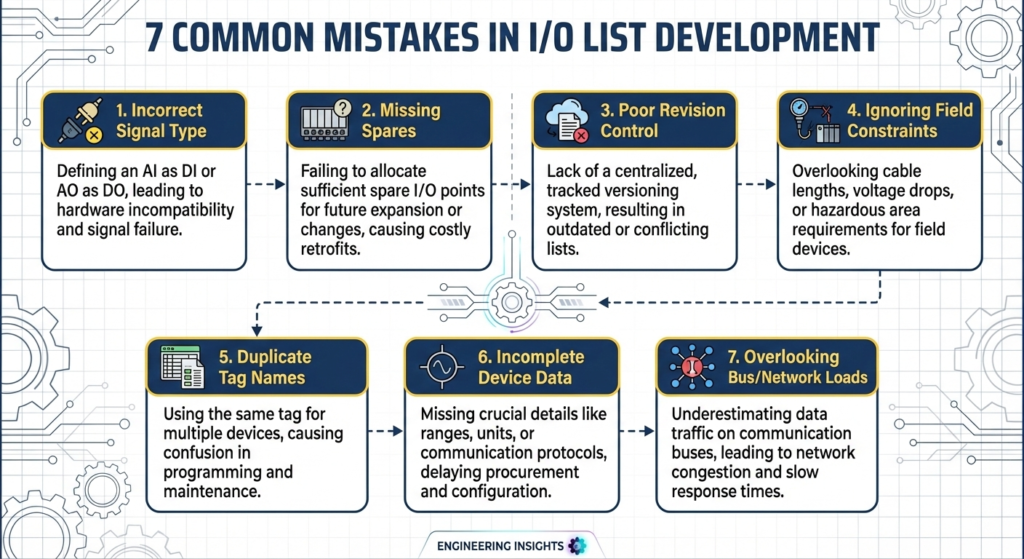
7 Common Mistakes in I/O Lists (That Cost Projects Money)

Avoid project delays and budget overruns. Learn the 7 common mistakes in I/O list development, from missing signal types to SIS vs BPCS misclassification.

In the world of industrial automation and process control, the I/O (Input/Output) list is the “DNA” of the project. It dictates the hardware requirements, the control cabinet design, and the software configuration.

Despite its importance, I/O list development is often rushed or delegated to junior engineers without proper oversight. This leads to errors that don’t surface until the procurement or commissioning phase—where they suddenly become incredibly expensive to fix.

Here are the seven most common mistakes in I/O list development that cost projects money.

1. Missing Signal Types

One of the most frequent errors is documenting a tag without specifying the exact signal type. Is that temperature transmitter a 4-20mA Analog Input (AI), or is it a direct RTD/Thermocouple connection?

Missing signal types lead to incorrect I/O module procurement. If you order a standard AI card but your field instruments require HART protocol or high-speed counters, you’ll face “Change Orders” that can stall a project for weeks while you wait for new hardware.

2. Wrong Fail-Safe Definitions

How should a valve behave when power is lost? How should a motor respond if the control signal is cut?

Wrong fail-safe definitions (confusing Normally Open vs. Normally Closed or De-energize to Trip vs. Energize to Trip) are safety hazards. If the I/O list specifies a “Fail-Close” valve as “Fail-Open,” the entire logic and wiring must be reworked. Correcting these errors during the Factory Acceptance Test (FAT) is expensive; correcting them during commissioning is a disaster.

3. SIS vs. BPCS Misclassification

This is perhaps the most critical error on the list. SIS vs. BPCS misclassification occurs when a safety-critical signal is mistakenly assigned to the Basic Process Control System (BPCS) rather than the Safety Instrumented System (SIS).

Safety signals require specific SIL-rated hardware and separate physical infrastructure. If you realize mid-project that a “standard” pressure transmitter should actually be part of an Emergency Shutdown (ESD) loop, you aren’t just changing a line in a spreadsheet—you are changing the entire architecture of the control system.

4. No Signal Grouping Logic

An I/O list shouldn’t just be a random collection of tags. No signal grouping logic results in a “spaghetti” layout in your marshalling cabinets.

Signals should be grouped logically by:

  • Process Area
  • Signal Type (Analog vs. Digital)
  • Voltage Level (24VDC vs. 120VAC)
  • Hazardous Area Classification (IS vs. Non-IS)

Without this logic, cable routing becomes a nightmare, and maintenance teams will struggle to troubleshoot the system for years to come.

5. Overlooking Spare Capacity

In an effort to save on initial hardware costs, many developers fail to account for “Growth Capacity.” A standard best practice is to include 20% spare capacity at every stage: spare terminals, spare I/O points, and spare cabinet space.

If your I/O list is “maxed out” from day one, the first time a field change occurs (and it will occur), you will be forced to add new cabinets and modules at a premium price.

6. Inconsistent Tagging and Naming

If the I/O list doesn’t match the P&IDs (Piping and Instrumentation Diagrams), confusion is inevitable. Inconsistent tagging leads to “lost” signals where the software engineer creates a block for a tag that doesn’t exist in the field. This disconnect results in hundreds of man-hours spent cross-referencing documents to find out where a specific wire actually goes.

7. Lack of Revision Control

The I/O list is a living document. Using a file named IO*List*Final*v2*Updated*USE*THIS.xlsx is a recipe for failure. Without a formal revision control process, the electrical team might be wiring panels based on Version 3, while the programmers are writing code based on Version 5.

The cost of “re-doing” work because of a version mismatch is one of the most avoidable expenses in project management.


Conclusion: Getting it Right the First Time

The I/O list is more than just a spreadsheet; it is the foundation of your entire automation infrastructure. By ensuring you have clear signal grouping logic, accurate SIS vs BPCS misclassification, and precise fail-safe definitions, you can prevent the “death by a thousand cuts” that ruins project budgets.

Investing time in a thorough I/O list review during the FEED (Front-End Engineering Design) stage is the best way to ensure a smooth, cost-effective startup.